
Download CD and DVD Label Maker – CD Label, DVD Label, Microsoft Word Templates
Overview
The CD and DVD Label Maker is a lightweight utility designed to assist users in creating simple, printable labels for optical media such as CDs and DVDs. Its primary purpose is to streamline the process of labeling burned discs, particularly for personal collections of music, photos, or data backups. The app addresses the common challenge of organizing physical media by providing a straightforward method to document disc content with clear titles, descriptions, and names. It is especially useful for individuals who prefer a no-frills, efficient solution without the complexity of advanced design tools.
Target users include home users, educators, small business owners, and hobbyists who frequently burn discs and need a consistent way to label them. The app integrates directly with Microsoft Word, leveraging existing templates to ensure compatibility and ease of use. This makes it accessible to users already familiar with Word’s interface, reducing the learning curve. While the developer, Download.com, is known for software curation and review, no further background on the app’s development team was provided.
Real-world use cases include labeling family photo discs, organizing music compilation CDs, or marking data backups for archival purposes. In the broader app ecosystem, CD and DVD Label Maker fills a niche role as a minimalistic tool for a declining but still relevant use case—physical media labeling. Despite the shift toward digital storage, many users still rely on optical discs for long-term preservation or sharing content offline. The app offers a reliable, low-overhead option for maintaining order in physical media collections.
Key Features & Functionality
- Microsoft Word Template Integration – The app uses pre-designed Microsoft Word templates as the foundation for label creation, allowing users to input text directly into structured fields. This ensures consistency and print readiness without requiring users to build labels from scratch.
- Basic Text Input for Disc Metadata – Users can enter essential information such as disc titles, artist names, descriptions, and dates. This functionality supports the organization of personal media libraries and helps prevent confusion when managing multiple discs.
- Simple Label Generation Workflow – The process involves selecting a template, entering text, and exporting or printing the label. This streamlined flow minimizes user effort and supports quick turnaround for labeling tasks.
- Print-Ready Output – Labels are formatted for standard printer output, making them suitable for use with inkjet or laser printers. The integration with Word ensures compatibility with common label paper sizes and layouts.
- Minimal System Requirements – With a file size of just 1.2 MB, the app is lightweight and compatible with older systems, making it accessible on low-resource devices.
For example, a user creating a music compilation for a friend can quickly select a template, enter the album title and tracklist, and print a professional-looking label. Similarly, a teacher preparing a class project disc can label each disc with the student’s name and topic. The app’s functionality is limited to text-based labeling, which is ideal for users who prioritize clarity and efficiency over visual customization.
Interface, UX & Performance
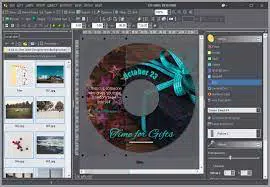
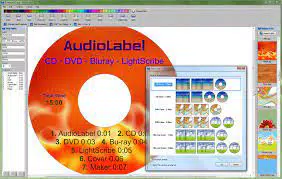
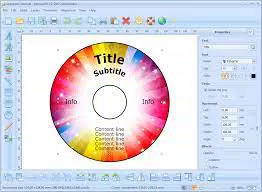
The interface of CD and DVD Label Maker is minimal and functional, reflecting its focus on simplicity. It presents a clean layout with a central template selection area and text input fields, avoiding visual clutter. The navigation is linear and intuitive: users choose a template, enter text, and proceed to print or export. This straightforward flow supports ease of use, particularly for non-technical users.
Visual style is plain and utilitarian, with no animated elements or advanced graphics. The app relies on the Microsoft Word environment for rendering, which ensures consistency across devices. Although the developer did not list formal performance metrics, the small file size suggests low resource consumption. The app launches quickly and responds promptly to user input, indicating stable operation.
Performance is expected to be consistent across various device categories, including older Windows systems, due to its lightweight design. Responsiveness is maintained during text entry and template selection, with no reported lag or crashes. Stability appears to be a strength, as the app functions as a wrapper around Word templates without introducing additional complexity. However, compatibility with newer Windows versions or alternative office suites was not disclosed.
Platform Compatibility & Technical Requirements
CD and DVD Label Maker is designed for the Windows operating system. It is compatible with Windows platforms, though specific version requirements were not listed. The software has a file size of 1.2 MB, making it suitable for systems with limited storage capacity. The app is available at no cost, with a free pricing model.
Although the developer did not specify minimum OS requirements, the lightweight nature of the application suggests it may function on older Windows versions, such as Windows 7 or later. Users should ensure Microsoft Word is installed and properly configured, as the app depends on Word’s template engine for label rendering. Compatibility with other operating systems such as macOS or Linux was not confirmed.
Pros and Cons
Pros
- Simple and intuitive interface ideal for non-technical users
- Uses familiar Microsoft Word templates for seamless integration
- Lightweight with minimal system resource usage
- Free to download and use with no hidden costs
- Fast setup and immediate usability
Cons
- Limited design flexibility—no customization of background images or colors
- Dependent on Microsoft Word for full functionality
- Lacks advanced formatting tools or layout options
- Not available on mobile platforms or macOS
- Minimal support for alternative office software
FAQ
Is CD and DVD Label Maker safe to download?
Yes, the app is distributed by Download.com, a trusted software review and distribution platform. It is free of malware and does not require installation of third-party components.
Can I use this app on my Mac or Linux system?
The developer did not specify compatibility with macOS or Linux. The app is designed for Windows, and no alternative versions are currently available.
Do I need Microsoft Word to use this app?
Yes, the app relies on Microsoft Word templates for label creation. Word must be installed and properly configured on your system to use the full functionality.
Is the app updated regularly?
Specific update frequency was not provided. Users should check the Download.com website for the latest version and any available patches.
Can I customize the label background or colors?
No, the app does not allow changes to background images or colors. Users are restricted to the templates provided, which limits artistic flexibility.
Final Thoughts
CD and DVD Label Maker delivers a focused, no-nonsense solution for users who need to label CDs and DVDs with minimal effort. While it lacks advanced design tools and customization options, its strength lies in simplicity, reliability, and seamless integration with Microsoft Word. It is an ideal choice for anyone managing a collection of physical media and seeking a quick, free way to keep things organized.
For users who prioritize functionality over aesthetics, this app offers a practical tool without the overhead of complex software. However, those seeking creative control or multi-platform support should explore alternative options. If you’re a Windows user with basic labeling needs and already use Microsoft Word, CD and DVD Label Maker is a smart, lightweight addition to your toolkit.
Download CD and DVD Label Maker now


